FAQs
- Home
- FAQs
How do I register a course?
You can register a course by clicking on the View button of the course. Select the course run date and click register. If the registration is full, you may select to put to waiting list if the course allowed.
Can I pay using my SkillsFuture Credit?
Yes, if the course allow payment using SkillsFuture Credit (SFC), you can pay using your SkillsFuture Credit.
Auto Application Method (Recommended)
At the payment page, click on the apply SkillsFuture Credit button, you will be redirected to the SingPass login page. After login, input the amount you wish to use and click submit. If your SkillsFuture Credit is insufficient, you can pay the balance via any payment mode to confirm your seat.
Once your outstanding payment is successful, you do not need to submit any document to SkillsFuture Credit. Your seat is automatically confirmed.
Manual Application Method (Not Recommended)
If you have already applied SkillsFuture Credit prior to register the course, it is recommended that you cancel the application and use the above auto application method to apply the SFC.
Nevertheless, if you wish to continue, on the payment page you can click the already applied SFC button to manually input your SFC claim ID, amount and upload the SFC letter. Once your application is approved by the Training Provider, you can pay the balance if any. Please note that you have to upload the receipt to the SkillsFuture Credit to complete your application.
Reserved and Pay Lather
If you have reserved the seat earlier and decided to use SFC(SkillsFuture Credit), please login and pay via the Auto Application method.
Alternative you can use the Manual Application Method (not recommended) or send the SFC(SkillsFuture Credit) letter to the Training Provider to request of manual upload.
How do I add my registration to the waitlist?
If the course run allowed waitlist and it is full, then you can select the course run date and proceed with the registration. You will be put in the waitlist.
Once a seat is available you will be notified and the seat will be reserved. Please complete your payment before the reservation due date otherwise it will be given to the next person in the waitlist.
Why I have an error during registration?
Some of the course have prerequisite. Please contact the Training Provider for assistance.
If you have already registered a course, you will not be able to register the same course until it has been ended.
How do I reserve a seat and pay later?
You can click to view the course, select a course run and click register.
Complete the required information and click next to the payment page. Click the Reserve and Pay Later button. Your seat will be reserved and you are required to pay before the reservation due date.
What happen if I missed the seat reservation payment due date?
If you missed the seat reservation payment due date, you can click on the pay button to pay if the seat is still available.
If the seat is no longer available, please delete and select another course run.
What is BLACKOUT date?
Blackout date is the date for that course run that all reschedule and withdrawal has to be approved by the Training Provider.
Before the blackout date, you can reschedule and withdraw your seat without approval. Fee may be applied per policy
Can I reschedule or withdraw my seat after registration?
Yes, you can reschedule and withdraw your seat.
After the course run blackout date, it is subject to approval. Admin fee may be applicable per policy.
How do I receive notification for future course run date?
You can view the course. Click on the Alert Me button on the right panel. You will receive a course run notification via email once there is a new course run. You can click Unsubscribe for further notification.
This course will automatically become your favorite course and you can view it in the FAV tab. You can add or remove the favorite course by clicking on the yellow star beside the course name when you view the course
What are the payment mode I can use to pay for my course?
The payment is decided by the Training Provider. At the payment page, you will see all the available payment modes available for that course.
Do I get refund to my SkillsFuture Credit if I withdraw from the course?
Yes, one day before the course start, your SkillsFuture Credit will be cancelled if you withdraw from the course successfully.
After that, any withdrawal is subject to the Training Provider approval. If your withdrawal is successful, you have to login to SkillsFuture Credit to cancel your application.
How do I apply SSG Funding to the course?
You do not have to apply SSG Funding if the course has funding. If you are eligible based on your Nationality, NRIC and Date of Birth (please click on the Profile tab to check your profile after login) your are automatically eligible for the funding. The funding amount is displayed and you only need to pay the Nett fee.
Where can I view my registered courses?
Click on the tab MY REGISTRATION. You can view the list of your registered courses.
Can I don't reserve the course seat and pay later?
Yes, you can don’t reserve the seat and logout. Your information will be saved.
You can login again to reserve or pay if the seat is still available. If seat is not available, please delete and register again.
How can I raise a Helpdesk ticket?
Click on the HELPDESK tab. Follow the instructions in the helpdesk page.
Can I register multiple Learners at one time?
Yes, if you have a Corporate Account, you can upload the file with multiple learners and register them at one go.
How to Create Multiple Accounts and Switch Account?
- You can create multiple accounts with the same login email address
- The account must has different company name
- The account can has the same UEN and billing information
- After the accounts are created, you can login using the same email address
- After login, click the arrow icon beside account name and select from the dropdown list which account to register the learners
When will I know if the courses that I have applied is confirmed?
For Self/Individual Registration
To complete the registration process, payment has to be made for the applied course. You will receive an email reminder 7 and 2 days earlier and (based on the email indicated during registration) once the course is confirmed.
For Corporate/Company Registration
Email reminder sent 7 or 2 days earlier course start date to personal and the officer-in-charge who completed the registration on your behalf will receive a confirmation emial from us. Please bring along this confirmation email on the first day of your course.
Where and How Can I make enquiries for courses?
For registration, please click here. Please note: Online Registration applicable for only certain courses.
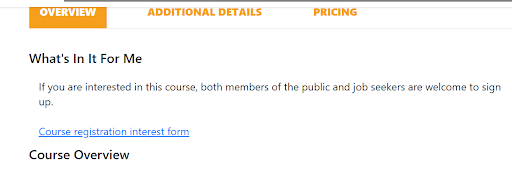
To make an enquiry/interest to take course, please can click on Course registration interest form of Course content page as screenshot below: